On Win 10
The program can save your work to PDF file directly. However, if you want to import PDF pages into your work, you need to download and install
Ghostscript for Windows. Please note that, you must download this 32-bit file even if your system is 64 bit.
Enable PDF read and write in Win7/Win8 (updated 2015-02-01)
In Windows 7 or Windows 8 versions, PageFocus uses open source software Ghostscript for Windows 32 and RedMon (Redirection Port Monitor) to
enable reading and writing in PDF. Download and install these two files and select Help/PDF Setup to set up PDF read and write.
1.
Download and install Ghostscript for Windows (32 bit). Please note that, you must download this 32-bit file even if your system is 64 bit.
2.
Download and install RedMon (Redirection Port Monitor). The file to be downloaded is redmon19.zip.
After download, unzip (must do this) the file. Right-click setup.exe if your system is 32 bit, or select setup64.exe if your system is 64 bit and then
select "Run as administrator" command to run it. Redirection Port Monitor will be installed in your computer.
3.
Start PageFocus and select Help/PDF Setup... to open the "PageFocus PDF Setup" dialog box, the top Status Report will show Ghostscript version 9.
15 installed and RedMon installed. These two items must be installed in your computer to run the PageFocusPDF Setup program.
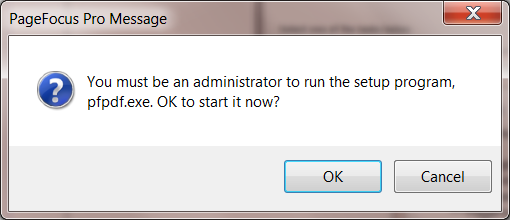
Select Start the setup program. You must be a administrator to run the setup program.
Select OK to start the PageFocus PDF program. The setup program re-displays "PageFocusPDF Setup" dialog box. Select "Setup Now" to complete
the setup. Check below for Windows 8 system.
Once it is completed a Save as PDF icon
will appear next to the Save icon in the Shortcut Tool Bar. Use the icon to save the current file in PDF.
Or select File/Save As, the Save as type will have .pdf option for saving the file in .pdf. File/PDF provides a set of menu for importing and exporting
in PDF.
In Windows 8 system, you will not be able to run the PageFocus PDF Setup program after selecting OK to run as an administrator. It is due to Windows 8.x
restricting use of unsigned driver. You will need to make change to allow an unsigned driver. Follow these steps to allow an unsigned driver:
1.
Press down the Shift key and Restart the Windows. Go to Windows Start/Shut Down, then press down the Shift key and select the "Restart"
command. Or, swipe to open the Charm bar, select "Settings", then select the "Power" button to bring up the Shut down menu. Press down the
Shift key and select "Restart".
2.
In the next screen (Choose an option screen), select "Troubleshoot" to display the "Troubleshoot" screen. Select "Advanced Options".
3.
In the next screen, select "Start-up Settings". The Start-up Settings screen displays 7 options. Just select the "Restart" button. The screen turns
dark. When it comes back, it displays a list of "Startup Settings". Select item 7"Disable driver signature enforcement" and press the function key F7.
Windows now will restart.
4.
After the restart, run PageFocus Program. Select Help/PDF Setup... to run the PageFocus PDF program. Windows will display a warning message,
select Install Anyway to allow running the PageFocusPDF program. When it is completed, a Save as PDF icon
will appear next to the Save
icon in the Shortcut Tool Bar and File/PDF menu is enable to read and write in PDFs.




©